Showing posts with label browser. Show all posts

Tuesday, October 6, 2009

Google Chrome OS vs Jolicloud

Since Google Chrome OS announcement has came down the pipeline from officials, most of reviewers on the web found themselves in tireless trial of opposing Chrome OS to Windows 7, Mac OS X Snow Leopard and Linux (Mint mostly). This all is very interesting and I recon debates will not stop even when Win 7 and Chrome OS will both be out of beta. Yet there could be a point missed in these discussions. Google underlines web orientation of the announced operating system, which in few words means it will do everything perfectly well until you decide to launch an app installed on your netbook, old PC, you name it, rather than using resources of web servers. Windows 7 on the other hand is meant to be everything for everyone. Therefore they are not quite in the same league. So, here is what we are going to do then – stack up Chrome OS with Jolicloud.

Jolicloud leaked in late '08. Tariq Krim, founder of Netvibes don't you know, and his team of two are basically the only people behind the whole project. He was the first to pronounce a lightweight web orientated OS for netbooks. Even though rumors about Google OS have appeared much earlier, right after Google browser has offered faster web experience despite being in beta I think, first official statement goes to Jolicloud. In fact there was no such thing as "web OS" back then (do not mess with Palm webOS). Anyway, what we have here is two operating systems which have in common, well, practically everything:

* Linux kernel

* Open source platform

* Web orientation and custom browsers

* Low system requirements

* Wide compatibility

* Plans for a powerful developer community


That's a rear thing to see so many matches today, isn't it? It might even appear that what we are having here is a great idea of one ripped off by another. I'd be careful here because this is not likely. Still, there are also important distinctions.

Google has the best search engine at the moment and many popular web services along that. This is their territory, this is where they earn money. Making an Internet operating system they are trying to enhance popularity of their prime source of income. Where Jolicloud has emerged from pure desire to give netbooks a needed eased up software environment.

How will these affect their market shares? Well, having larger developer power behind its shoulders, Chrome OS will plausibly have less glitches and bugs and be more flexible, because fixing serious problems is nothing like it is for Tariq Krim and mates. There is also a sense that Google will not lay off and go on and on promoting Chrome OS, and Jolicloud, who knows how they will react to different obstacles, whether they even will. I just can not have the same credence in both.

Jolicloud is now available in Alpha 2b version, that's a 600MB download. Be sure to check availability list before testing it. As a consumer advice though, with which in mind I started this showdown, do not get used to Jolicloud so far – there might something even better cooking. With the whole respect to Tariq Krim, he would be so much better of if he were half a year faster.

Google Chrome 3.0.195.21 stable

Google Chrome 3.0.195.21 screenshotNew stable version of Google Chrome web-browser now sees the light of the day. I have been playing with 3.0.195.21 for a couple of days now and was glad to find out that all what you got used to in Google Chrome is still right on its place. And there is more added to Google’s ability to not spoil things for more than a year now. New features and impressions after the jump.


Under the hood

Not so much as a feature, but anyway Chrome developers claim to give JavaScript performance 150% boost. It shows immediately if you are an experienced Chrome user but if you aren’t you will probably hardly be able to tell. I mean Chrome 3 is blazingly fast but then it was almost like this since the day one. But not so stable. I personally can point out better Flash performance, which by the way is dropped off if you happen to open a HTML5 page. Its goodies are supported in v3.0.195.21 stable as standard.

User interface

User interface has been added the biggest instantly noticeable amount of improvements. First, there are 28 new themes for the browser starting with minimalistic white skin and ending with funky graffiti. Also a minor but useful improvement can be found in the Omnibox. Now when you start typing a search query or an URL it lets you know where all the suggestions come from like search engine, visited links history, etc. Home screen has also changed. The bookmark list at the right is out, instead we have our thumbs in two rows with four thumbs in each. One thumbnail less than before, but now their order is fully customizable. You can arrange them in a plain and simple list also.

The good

Not a single crash even though it was enthusiastically given rich JavaScript pages and pages with Flash to cope with. Chrome 3.0.195.21 did both hands down. It also loads faster from the click on the desktop.

The (not so) bad

I still miss my ninth thumbnail and I couldn’t really find a better theme and as a result left it with the default one at the end of the day. I also miss my list of bookmarks but the bar above is still there to help.

Wednesday, September 2, 2009

Opera 10 launches and comes with Turbo installed

img-opera10-screenshotOpera launched the latest version of the Opera browser dubbed Opera 10. Opera 10 is not only free, but has a wide reach since it is compatible with Windows, Mac and Linux platforms in addition to being available in 43 languages. One of the prominent features of the new browser is a new technology called Opera Turbo.
Opera Turbo is a compression technology that improves the speed of page loads over a slow connection such as one with a 3G card or sluggish Wi-Fi connection. According to tests performed by Opera, the technology offers a website experience eight times faster than other browsers over a slow connection. To emphasize this compression technology Opera offered the following video on YouTube.

Wednesday, August 5, 2009

Make Mozilla Firefox Load Pages Faster

Tweak Network 1.3 is the mozilla addon which will speed up the loading of web pages and increase the maximum number of simultaneous downloads from a site. If you are using Firefox browser? There are many ways to make Firefox work faster; perhaps you have ever read many tips on the internet to make Firefox faster.Now i will share a tip to make your Firefox faster which is installing Tweak Network Add-on.

It is very easy to get Tweak Network Add-on; you just need to download it here

After going there click on Add To Firefox > Then it will Ask for Install > Click I
nstall Button > Then the Add On will get installed > It will Ask for restart of Firefox Restart it .

After you install Tweak Network Add-on, please follow the guides below.Please run your Firefox. Click Tools menu, when the options appear, click Tweak Network Settings.


Then an alert will appear Click OK. Now window will open.
Click Power button, then click Apply button ,Then Click OK Done


I hope this will speed up your mozilla if it works slow. Best of luck for this addon.Happy Browsing.

Sunday, July 19, 2009

Mozilla starts Contributions pilot for Firefox Add-on developers

The developers behind some of the more popular add-ons created for the Firefox browser are the unsung heroes of Mozilla’s browser success. The Firefox browser on its own is a great piece of software, but it is made all the more usable by the large array of add-ons available to enhance it.

Mozilla has decided its about time those developers were able to easily get some recognition for their efforts in the form of cold, hard cash. To that end, a new pilot has been launched this week called Contributions which allows add-on developers to easily receive a donation (contribution) from Firefox users as a way of saying thankyou or for funding continued development.

The Contributions system is voluntary. Developers can set it up for their add-ons, but its up to users if they decide to contribute or not. The transfer of money will be handled through PayPal who Mozilla is currently setting up the payment system with. The other good news is Mozilla aren’t taking a cut and the developer will receive all funds minus the PayPal transaction fee.

Along with the Contributions pilot Mozilla has also introduced “About the Developer” areas which sound like they will act just like a mini-blog. The developer can give details about the add-ons they develop, themselves, and what the future holds.

Monday, July 13, 2009

Copy HTML Links With Firefox

If you ever wrote an article that included a long list of links you know how boring and time consuming it can be to copy the text of the link first, then flip back to the page, copy the URL, and then finally create the link.

The solution for this problem can be found in Firefox extensions that allow you to copy HTML links on the fly; meaning that they enable you to copy simultaneously the link text and HTML, and once you paste it you will already get the HTML code ready to go.

colt.pngThe most used extension for this purpose is called CoLT. Basically you will need to right click on the link you want to copy, move the mouse over “Copy Text Link and Location As,” and then select “HTML Link.”

I have used it for a while, but I don’t link the fact that I need to go through two sets of menus. It adds one unnecessary step to the process.

My favorite extension that does a similar job is called Copy as HTML Link. Here you will need to select the text that you want to be used on the link, right click over it and select “Copy as HTML Link.” Notice that instead of copying an existing hyperlink on the page this extension we create a link with the text you highlighted and with URL of the page you were visiting.

copyhtmllink.jpg

In reality the two extensions could co-exist since the former copies the HTML of existing hyperlinks while the latter creates an HTML code based on the text you select and the URL of the page. Test them and see which one will fit your browsing habits.

Thursday, July 9, 2009

Firefox 3 Review - It’s Simply Amazing

Firefox 3 has arrived and my behavior has changed right from the instance I have switched to Firefox 3. The sudden gush of excitement has made me more happier and I am starting to become more smart in the web world. Is it due to Firefox or something else, I am not sure but one thing which I am sure about is you must and must switch to Firefox 3. Its rare that you come across something very perfect, efficient, creative and beautiful all at the same time, and this time its in the form of Firefox 3. Beauty has certainly met brains in the new version.

Without letting any of my excitement down, I am going to tell you the amazing things that I found in Firefox 3. First of all the startup time of Firefox 3 is much quicker than Firefox 2. The next things which strikes as it starts is its appearance. I have fallen in love with the two little glowy buttons for back and forward browsing. :)

Firefox 3 Buttons Large Firefox 3 Buttons Small

Now We Have The Awesomebar!

The show stealer of the entire futuristic parade of Firefox 3 is its address bar or awesomebar. Its awesome in its true sense. You wouldn’t even have imagined that the lame old address bar can sometimes mean so much than just typing in URL’s. With this revolutionary address bar in Firefox 3 you would soon forget having to remember URL’s.

Yes, you don’t have to remember those lengthy creepy URL’s once you have Firefox 3 in your control. The address bar is so smart it can detect the correct URL when you just type in the actual keywords which had made you open that page. For example, if you had opened a page which contained some information on “Firefox” and later on forgot which URL you had opened, just type in “Firefox” and the page URL would prompt up the list with “Firefox” highlighted. Incredible I must say.

Firefox 3 Awesomebar

You may be guessing already what makes it so smart? Well, from the past, Firefox has been keeping a store of the web page titles by caching in the URL’s you were opening up. But until the launch of Firefox 3, it was never used to good effect. Now in the new version, it makes a really good use of these title’s. Its a high probability that you would remember something in the page titles if you want to get back to the page you had visited earlier. So, its likely that instead of putting in the actual URL you would be putting the right keywords, and the right keywords are always present in? You guessed it right, in the page title of the page. This trick, has really transformed the address bar into Awesomebar.

The Amazing Download Manager

It was a lenghty wait and now the wait has been sweetly fulfilled by the Firefox 3 team. The much needed pause and resume feature of the download bar actually works in Firefox 3. Earlier, even though this feature was present, it lacked proper functioning and so you couldn’t rely on your resuming the downloads. But this time works. Yeehaa! With the amazing Download Manager you can again visit the page from where you had downloaded the file and also if you haven’t cleared the list you can search for the downloads.

Firefox 3 Download Manager

I would expect the next version to have multiple simultaneous connections so that I would not have to use Flashget. :D

The Amazing Addon Manager

This is another show stealer after the Awesomebar. Remember those good old times when you wanted to add you favorite addons, you first searched Google or the addon’s page of Mozilla. Then you used to go to the page to read about the addon, see the ratings and then actually download the addon. Zip forward to Firefox 3, the good old days will become more better with the new addon manager. It’s got an inbuilt search engine which displays not only the relevant addon’s based on the search criteria but also the description which you would have seen on the actual addon page and it also shows you the rating! It was unbelievable for me when I saw this in action.

Firefox 3 Addon Manager

To be true the when I said that my behavior has changed from the instance I downloaded Firefox 3, the feature which made it happen, was the Addon Manager. I have stopped being lazy in searching addons, and since I have an embedded search option, I have started to download addons like crazy. Its driving me mad. In just a day I have found so many amazing addon’s that had made my web browsing experience much much richer. I would put up a post soon for telling you about the addons which are my favorites.

Firefox 3 is a browser that you must not wait for downloading. The record of 8 million Firefox 3 downloads in just 24 hours is enough to prove this. The world is waiting for more. So without wasting much time, grab it here fast!

Load Time Analyzer for Firefox

This is a very useful Firefox extension for web developers, designers and bloggers. We all know that speed is a key component of usability, and that the loading time of your website will make the difference between people actually navigating it or just skipping it altogether.

Load Time Analyzer is a Firefox extension created by Google that displays the number of events that are processed by a certain website and how long it takes to load them all. The load time displayed will obviously be influenced by your Internet connection, nonetheless it can provide a good indicator of the site speed.

The most interesting part of this extension are the detailed graphs that it outputs for every single site. On the graphs you will be able to see what objects are creating bottlenecks, how many external requests the site has, what plugins or scripts are placing requests and so on.

Tuesday, July 7, 2009

Google Released Page Speed for Firefox

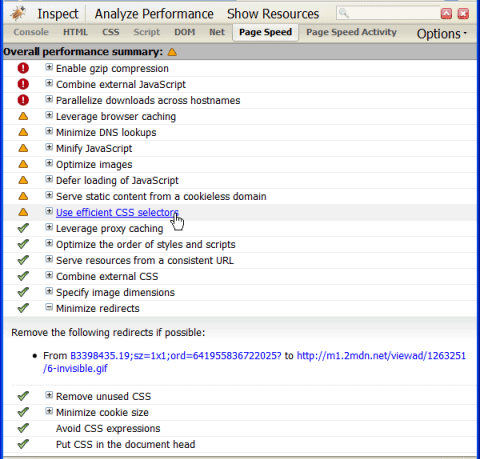
Google just released a Firefox/Firebug add-on called Page Speed. It is basically a tool that will help you improve the loading performance of your website. After you run it, you will see a list with all the factors that would make your site load faster, with an image illustrating whether or not your website checks for each.There are some similar plugins available for Firefox, but this one seems to be more robust. It checks for a wide range of optimization steps, including proxy caching, DNS lookups, CSS combination, Javascript loading and parallel downloads. Worth a try.

Thursday, June 11, 2009

Google takes browser wars to the next level, airs Chrome TV ads

Last week, Google brought browser wars into your living room with Chrome TV ads. The first-ever TV commercial from the search giant may be designed to raise awareness of the browser but it also puts Microsoft’s multi-million dollar ad blitz to shame.

This is the first time ever that Google is airing TV ads. According to the Wall Street Journal, the search giant planned to launch their first TV ad campaign during last summer’s Olympics, but it was halted at the last moment by Google’s co-founders Sergey Brin and Larry Page. Google’s Chrome TV campaign premiered with an ad based on a short video produced by the Google Japan team two months ago. Since then, the video has been viewed over two million times.

True to its online heritage, the Google leveraged some of the results from placement-targeted ads on the Google Content Network in order to better track the impact of these ads on target audience. “For those of us who live and work on the web, the browser is an unsung hero,” Google said “It’s become the most important piece of software on our computer, but rarely is it given proper recognition…”

You may have seen this cool video on the web before: It shows sand-boxed wooden objects and Chrome logo that ping-pongs between them, slowly revealing the browser’s user interface. A simple “Install Google Chrome” message fades in at the end of the ad. Riding on tails of this ice-breaker ad, Google has produced Chrome Shorts, basically a series of eleven short films about Chrome that appeared last week on the Chrome YouTube channel.

One of them, dubbed “Defenders in Tights,” shows monochromatically-dressed people who build a wooden browser interface that ultimately serves as defense “all kinds of technological mischief.” According to the company spokesman, these short clips won’t be used in the Chrome TV campaign.

The videos follow the same easy to grasp narrative of the Chrome TV ad that delivers the message without diving into computer technicalities. Christoph Niemann , artist and illustrator who created one of short films, said the following: “Instead of thinking of what I wanted to show, I tried to think about what I did NOT want to show. I realized that when I use a computer or browse the web these days, the one thing I do NOT think about is… a computer.” Niemann said he wanted to find “a simple metaphor that explains what a browser does, without showing a screen, a keyboard, the letters WWW, pixels, zeroes or ones.”

According to the latest NetApplications web usage survey, Chrome still hovers above the 1 percentage web usage share and trails behind Firefox, Safari and Internet Explorer that hold most of the browser market share. According to NetApplications, Chrome recently zoomed past Opera which has been positioned as the #4 browser so far.

Apple releases Safari 4 as “the fastest browser on any platform”

The final version of Safari 4 for Mac and PC desktops, released today, leaves rival browsers in the dust with a speedy JavaScript engine and standards-compliant WebKit rendering platform.

Apple announced that it has finalized Safari 4 at today’s WWDC keynote address. The browser is now available for OS X (Tiger and Leopard) as well as Windows (XP and Vista) and packs virtually no new features compared with the latest beta that has been out since late February.

Apple executives gave the most stage time to highlight Top Sites, the eye candy feature that renders thumbnails of your most visited sites mid-air, with cool reflections. However, many would be likely turning it off as it can be a significant resource hog on slower systems. While the browser lacks settings toggle for Top Sites, there are a number of Safari hacks that can turn the feature off.

On a brighter front, Apple claims that Safari 4 remains the world’s fastest web browser, citing tests that portray the browser 7.8 times faster at JavaScript interpreting than Microsoft’s Internet Explorer 8 and five times faster performance over Chrome 2. Powered by a byte-code optimized engine dubbed SquirFish Extreme, JavaScript in Safari should perform 50 percent faster when the browser is used with Snow Leopard (available in September) because the browser’s JavaScript engine runs in Snow Leopard’s 64-bit mode. An on-stage demo wowed the crowd with near-instant rendering of Google Maps, for example.


Safari 4’s WebKit rendering platform passes the Acid3 test with a 100/100 score. The test is used to measure how well a browser follows common web standards, an important factor for web developers who can rely on the browser to render web pages as intended, as opposed to spending additional time and money on putting in extra code to counter for the rendering inconsistencies. For instance, current IE8 version scores just 21/100, the least of all browsers, meaning developers need to put in IE-specific code to make the browser render pages correctly.

The presentation highlighted “crash resistance” as a new feature, stemming from the design that calls for a sandboxed environment that isolates tabs and plugins in their own processes, just like Google’s Chrome. Safari 4 also decodes QuickTime files faster due to a hardware-accelerated engine and packs a new streaming method that works with any webserver. Crash resistance will work only under Snow Leopard since it leverages new technologies that the operating system offers. The browser will come built-in with Snow Leopard.

Safari 4 also features an iTunes-like Cover Flow view of your bookmarks and browsing history and several other features previously described in my review of Safari 4 Beta.

Apple also said that the iPhone OS 3.0 software will include the latest version of mobile Safari. The company claims the browser packs three times faster JavaScript engine over mobile Safari version that ships with iPhone 2.2 firmware. In addition, it supports HTTP streaming of audio and video courtesy of

Tuesday, June 9, 2009

Google releases Chrome for Mac and Linux but…

Versions of the Chrome browser for Mac and Linux platforms are now available, but Google is urging users not to download them to use as a standard browser.

The released developer channel builds are for developers only to test. They are so bad in fact that your system may crash and many of the standard content you expect to view in your browser just won’t work.

The warning on the Chromium Blog about the availability of the builds reads as follows:

Whatever you do, please DON’T DOWNLOAD THEM! Unless of course you are a developer or take great pleasure in incomplete, unpredictable, and potentially crashing software.

How incomplete? So incomplete that, among other things, you won’t yet be able to view YouTube videos, change your privacy settings, set your default search provider, or even print.

So consider yourself warned and download these builds at your peril. And if that isn’t enough to put you off just check out the bug list.

Friday, June 5, 2009

New Opera 10 beta version with increased web browsing speed

The beta version of the famous web browser Opera 10 was started on Wednesday. To attention of the user was presented new performances, high speed and new user-friendly design. Let’s look through updates.

The Opera 10 now allows user to redesign browsers background how ever they want and to resize tab bar. Also user can add from 4 up to 25 favorite web sites for quick access. The most appreciable upgrade is the speed of web browsing. It is possible using new Operas browsing engine.

The beta version of Opera 10 also gives users ability to work with their e-mail services. Now user can simply integrate it to the web browser. Also a spell-check function was added. It works with Facebook, blog and e-mail services.

Opera 10 is now safer. If the browser found any problems it will automatically restart. After restarting it will recover all viewed tabs and will provide crash report.

The beta version can be installed on Mac os X 10.3 or higher. User can download it free from the official Opera website.